AI and Automation Implementation.

One job you repeat every week, made to run itself, with the hours counted.

Fifteen minutes, no cost.

Orders and accounts

Website orders arrive in your accounting software, ready to invoice

An order comes in on the website, the customer is created in your accounting software if they are new, and the sale is raised against them. Nobody re-types it.

Trigger
Every order
Time saved
12 hrs a month
Reviews and reputation

A bad review reaches you the same day, and the customer hears back

A review of three stars or under comes in. You are told that day, and the customer gets a reply asking them to email you with the details, which moves the conversation off the public listing.

Trigger
Every review of three stars or under
Time saved
1 hr a week
Quotes and invoices

Overdue invoices come back as a chase, ready to send

Once a week the unpaid invoices are read against the work they cover, and each one comes back as a drafted email naming the job and the amount. You read it and press send.

Trigger
Weekly
Time saved
2 hrs a week
Enquiries and inbox

The same shipping and returns questions get answered without you

An enquiry lands and is checked against your own shipping and returns policy. Where the policy answers it, the reply is drafted from that policy and waits for you to approve.

Trigger
When an enquiry lands
Time saved
2 hrs a week
Stock and suppliers

The supplier’s stock file gets checked against your store

The file is compared line by line with what your store lists, and you get the differences: prices that moved, items that are gone, and items you do not sell yet.

Trigger
Every supplier file
Time saved
1.5 hrs a week
Reporting

Monday morning starts with last week’s numbers in your inbox

At 7am each Monday the week’s sales, orders and average order value are pulled from the store and sent to you beside the week before.

Trigger
Each Monday 7am
Time saved
45 min a week

Six of thirty-four jobs. See them all

Where your week leaks

It is rarely one big thing. It is the same twenty minutes, several times a day. An order re-keyed into the accounts. A quote chased. An inbox sorted by hand. A report rebuilt from the same three exports. Nobody counts it, because everybody has always done it.

Alongside what you do now, until it holds. Nothing leaves the business without a person’s say.

Nothing is ripped out. The first job is whatever your week is full of, and we start with that one.

See every job we could take off you

How can I work with you?

Three ways in, and they build on each other. Start with an hour if you have a question, move to a project when there is a problem worth solving, and make it ongoing when automation stops being a one-off. If you are not sure which one fits, that is what the call is for.

  1. Start small

    Session

    $240 an hour, excluding GST

    An hour of help on whatever is in front of you. Advice on an approach, a look at something that has stopped working, or a small job you already know needs doing. Nothing to scope, and nothing to commit to past the hour.

    • You want a second opinion before you buy a tool or sign up to a platform.
    • Something you built yourself has broken and you want it looked at.
    • You already know the task and you would rather someone just did it.
  2. Solve something valuable

    Automation Project

    Priced on what it returns for you

    A defined business problem, solved end to end. The price follows what solving it is worth to your business, not the hours it takes us to build. Scope and complexity shape it, and it is agreed in writing before anyone starts.

    If we need to investigate the opportunity before we can scope it responsibly, we start with an Automation Roadmap. A job that is already clear skips it and goes straight to a scoped build.

    It is half a day with the people who do the work, and it produces the five things any build needs: the process written down, a systems and data map, what the job costs you now, a prioritised build list, and a go or no-go on each. Yours to keep, whoever builds it.

    • Automation Roadmap, remote

      From $1,400, excluding GST

      The workshop over Zoom. One customer type and one critical-path workflow, mapped end to end, with the report, the deck and the quote.

    • Automation Roadmap, in person

      From $2,400, excluding GST

      The workshop on site and technical. Several workflows, several customer or user profiles, and a read across the systems that hold your data.

    How the roadmap works
  3. Make it ongoing

    Fractional Digital Strategist, AI and Automation

    From $10,000 a month, excluding GST

    Someone on your team whose job is this. Week to week they look across the business for the work worth automating, rank it, build it, and keep improving what is already running.

    It is for businesses where ongoing automation work has outgrown one-off projects, and where quoting each job on its own has become the thing slowing you down.

Book a discovery call

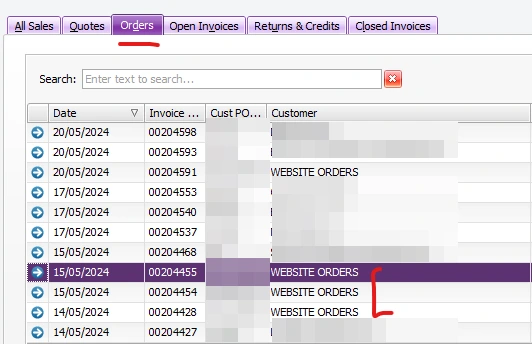
Every order on TRA Australia’s website raises its own sale order in MYOB AccountRight, and has done since October 2024.

Read the case study
The MYOB AccountRight orders register at TRA Australia, with four website orders sitting under the WEBSITE ORDERS customer card among the trade accounts, whose names are blurred.

Thirty-four jobs a business repeats.

Each one is a job somebody does by hand today, with what sets it off and the hours it hands back.

Filter by group
  • Website orders arrive in your accounting software, ready to invoice

    An order comes in on the website, the customer is created in your accounting software if they are new, and the sale is raised against them. Nobody re-types it.

    Trigger Every order

    Time saved: 12 hrs a month, saved

    Orders and accounts

  • A bad review reaches you the same day, and the customer hears back

    A review of three stars or under comes in. You are told that day, and the customer gets a reply asking them to email you with the details, which moves the conversation off the public listing.

    Trigger Every review of three stars or under

    Time saved: 1 hr a week, saved

    Reviews and reputation

  • Overdue invoices come back as a chase, ready to send

    Once a week the unpaid invoices are read against the work they cover, and each one comes back as a drafted email naming the job and the amount. You read it and press send.

    Trigger Weekly

    Time saved: 2 hrs a week, saved

    Quotes and invoices

  • The same shipping and returns questions get answered without you

    An enquiry lands and is checked against your own shipping and returns policy. Where the policy answers it, the reply is drafted from that policy and waits for you to approve.

    Trigger When an enquiry lands

    Time saved: 2 hrs a week, saved

    Enquiries and inbox

  • Trade customers order online at their own prices

    A trade customer logs in and sees their account pricing and everything they have bought before. They reorder themselves, and it lands priced correctly instead of as a phone message somebody has to key in.

    Trigger Every wholesale order

    Time saved: 1.5 hrs a week, saved

    Orders and accounts

  • A stalled parcel reaches you before the customer does

    Every parcel in transit is checked daily. If the carrier goes quiet for longer than that run normally takes, you are told which order it is, and the order closes itself once the parcel is delivered.

    Trigger Daily, and on every delivery update

    Time saved: 1.5 hrs a week, saved

    Scheduling and jobs

  • The store and the sales report get squared off

    Every order in the store is matched against the sales report, line by line, and you get back only the ones that disagree and what is different about them.

    Trigger After a reporting change

    Time saved: 17 hrs a full reconciliation, saved

    Reporting

  • Buyers see what is on backorder before they order it

    Your stock system flags an item as on backorder and the product page says so, with the expected date. The order does not arrive and then need a phone call to unwind it.

    Trigger Every backorder flag from the ERP

    Time saved: 1.5 hrs a week, saved

    Stock and suppliers

  • Every part shows the other parts that fit it

    Your system already knows which parts go together. The website reads that and lists them on the product page, so a customer finds the right fitting instead of ringing to ask.

    Trigger Every cross-sell link from the ERP

    Time saved: 1.5 hrs a week, saved

    Stock and suppliers

  • New trade accounts get their login without ringing you

    Someone applies for an account and you approve it. They get an email that lets them set their own password and go straight in, so nobody on your side is sending logins by hand.

    Trigger Every new account

    Time saved: 1 hr a week, saved

    Orders and accounts

  • Product photos too small to sell from get swapped for better ones

    Every image in the catalogue is checked against what the manufacturer publishes. Where a bigger, cleaner version exists it is fetched, matched to the right product and swapped in.

    Trigger Every image the manufacturer has a better version of

    Time saved: 22 hrs a catalogue sweep, saved

    Stock and suppliers

  • The emails only you can answer sit at the top of the inbox

    Each email is read as it arrives, matched to an order where there is one, and sorted. Anything a stock reply or somebody else can handle moves out of your way.

    Trigger Each email as it lands

    Time saved: 1.5 hrs a week, saved

    Enquiries and inbox

  • Where is my order emails answer themselves

    The email arrives, the order and its tracking are looked up, and the reply goes back with the carrier scan and the date to expect it.

    Trigger Every where is my order email

    Time saved: 1 hr a week, saved

    Enquiries and inbox

  • Long customer emails arrive as a summary and a draft reply

    A long message lands, is read against what that customer has ordered, and comes back as a few lines of what they actually want plus a reply you can edit and send.

    Trigger When a long message lands

    Time saved: 1 hr a week, saved

    Enquiries and inbox

  • Orders that arrive by phone or email get typed in for you

    The order is read out of the email or the call notes, matched to the right customer and the right products, and entered into your order system for you to check.

    Trigger Every order that arrives by phone or email

    Time saved: 2 hrs a week, saved

    Orders and accounts

  • The day’s orders reach your accounting software overnight

    At the end of each day every order goes across as a sale against the right customer, so the accounts are current when you open them rather than a week behind.

    Trigger Daily

    Time saved: 13 hrs a month, saved

    Orders and accounts

  • Payments get matched to orders, and the odd ones flagged

    Each day the money that came in is matched against the orders it belongs to. Anything that does not line up is listed for you now instead of found weeks later.

    Trigger Daily

    Time saved: 3.5 hrs a month, saved

    Orders and accounts

  • Unpaid invoices chase themselves, politely, on a schedule

    Seven days past due the customer gets a reminder with the invoice attached. If it stays unpaid the next one follows, and you are told when somebody has stopped replying.

    Trigger Seven days past the due date

    Time saved: 2 hrs a month, saved

    Quotes and invoices

  • Quotes that go quiet get followed up instead of forgotten

    Three days after a quote goes out with no answer, the customer gets a short follow-up with the quote attached, and you get a list of who is still deciding.

    Trigger Three days after the quote goes out

    Time saved: 2 hrs a month, saved

    Quotes and invoices

  • An accepted quote becomes an invoice without being retyped

    The customer accepts, and the same lines, prices and job details come across into an invoice in your accounting software, ready for you to send.

    Trigger When a quote is accepted

    Time saved: 2 hrs a month, saved

    Quotes and invoices

  • The supplier’s stock file gets checked against your store

    The file is compared line by line with what your store lists, and you get the differences: prices that moved, items that are gone, and items you do not sell yet.

    Trigger Every supplier file

    Time saved: 1.5 hrs a week, saved

    Stock and suppliers

  • The purchase order is drafted before you run out

    Stock is checked daily against what is selling and how long that supplier takes. When a line is heading for zero the order is drafted to the right supplier for you to approve.

    Trigger Daily

    Time saved: 1 hr a week, saved

    Stock and suppliers

  • Returned items go back into the stock count on arrival

    A return is booked in, the item is put back as sellable or as damaged, and the store’s stock number moves with it, so the website stops selling what you do not have.

    Trigger When a return arrives

    Time saved: 2.5 hrs a month, saved

    Stock and suppliers

  • Every finished job asks for a review by itself

    A day or two after the job or the delivery, the customer gets a message with a direct link to your Google listing. Nobody has to remember which customers to ask.

    Trigger After each job or delivery

    Time saved: 2 hrs a month, saved

    Reviews and reputation

  • Every review comes back with a reply already written

    A review lands and a reply is drafted in your words, answering what the customer actually mentioned. You read it, change what you want, and post it.

    Trigger When a review lands

    Time saved: 1 hr a month, saved

    Reviews and reputation

  • Monday morning starts with last week’s numbers in your inbox

    At 7am each Monday the week’s sales, orders and average order value are pulled from the store and sent to you beside the week before.

    Trigger Each Monday 7am

    Time saved: 45 min a week, saved

    Reporting

  • Ad spend and sales sit on the same page, updated daily

    What you spent on Meta and Google and what the store took are pulled together each day, so you can see what the advertising returned without opening three dashboards.

    Trigger Daily

    Time saved: 2 hrs a week, saved

    Reporting

  • Ask how last month went and get a straight answer

    You ask in plain words. The store and the accounts are read, and the answer comes back as a few sentences with the numbers they came from.

    Trigger When you ask

    Time saved: 2 hrs a month, saved

    Reporting

  • Products missing a photo or a description get flagged weekly

    Once a week the catalogue is checked for listings with no image, no description or no price, and the list arrives with the quickest fixes first.

    Trigger Weekly

    Time saved: Counted on the call

    Reporting

  • New products arrive with the description already drafted

    The supplier’s spec sheet is read when a product is added, and a description is written from it in your own words, with the specifications kept as they are.

    Trigger When a product is added

    Time saved: 5 hrs a month, saved

    Writing and content

  • The monthly newsletter turns up as a first draft

    What sold, what is new and what is nearly gone are pulled from the store each month and written up as a draft in your email platform for you to edit.

    Trigger Monthly

    Time saved: 3 hrs a month, saved

    Writing and content

  • The specs and photos are gathered before you list anything

    Before a new product goes live the supplier’s page is read for specifications, images and documents, and it all lands in one place ready to build the listing from.

    Trigger Before a new product goes live

    Time saved: 3 hrs a month, saved

    Writing and content

  • Booking a job tells the customer when you are coming

    The job goes in the calendar and the customer gets the date, the arrival window and who is turning up, then a reminder the day before.

    Trigger When a job is booked

    Time saved: 1.5 hrs a week, saved

    Scheduling and jobs

  • The job notes and photos land on the invoice by themselves

    When the job is marked finished, the notes, the hours and the photos taken on site come across into the invoice draft, so nothing is written out twice.

    Trigger When a job is finished

    Time saved: 2 hrs a week, saved

    Scheduling and jobs

The first one is what the discovery call is for. Book a discovery call

The stores and websites these automations sit inside live on eCommerce and Web.

Questions we get asked

The ones that come up on nearly every AI and automation call.

What does this cost?
It depends which of the three ways in you need, and every price is on this page. An hour is $240. A project is priced on the problem it solves rather than the hours it takes, and that price is agreed in writing before anyone starts. If the opportunity has to be investigated before it can be scoped, the roadmap is a fixed price in one of two tiers. Maintenance is agreed before the build starts, so you know what it covers and what it costs before you commit. If the budget is tighter than the scope, we would rather reduce the scope than the price.
What does maintenance actually cover?
It keeps what we built working. Monitoring, fixes when a supplier or an API changes underneath it, and the small tweaks that hold the scope we agreed. A new automation is a new project, quoted on its own, so maintenance never quietly becomes the budget that new work comes out of.
How do we know it worked?
We take a baseline before anything is built, which is what the job costs you in hours and people today, and then we measure against it at thirty, sixty and ninety days. You see the same numbers we do. If the result is not what we said it would be, that is a conversation we start rather than one you have to chase.
Who pays for the hosting, licences and AI usage?
You do, on your own account, in your name. The roadmap puts a monthly figure on it and shows the usage that figure assumes, so you can check it against your own volumes. Nothing about running the thing is a surprise later, and nothing sits behind an account of ours.
Can we have the wider team in the workshop?
The roadmap workshop is the handful of people who actually run the work, because that is who can answer the questions. If you want the wider team in the room, we run a strategy workshop with them as a separate session.
Do we have to buy the roadmap?
No. If you already have the process written down, a systems map, what the job costs you now and a ranked list of what to build, bring them and we start there. The roadmap is how we produce those things with you when they do not exist yet, which is most of the time.
How long does it take?
The roadmap is half a day with the people who do the work, and the report and the deck follow it. It ends with how long the first build will take, quoted with its fixed price, so you decide with both numbers in front of you rather than one.
What if the job is not an order moving between two systems?
Then it is one of the other jobs on the list above. Most of them are not orders at all: a review that needs reading, an invoice that needs chasing, a photograph that needs replacing, an inbox that needs sorting. Which one goes first comes off the build list, which ranks every repeat job on the hours it would give back and what a mistake costs. That is an answer you get from the requirements rather than a guess we make now.
Will this replace people?
Not in the businesses we work with. It removes the part of the job nobody wanted, the re-keying and the chasing, and gives that time back to the person who was doing it. Every automation we build stops and waits for a human before anything leaves the business.
Our data is sensitive. Where does it go?
That is the first thing we work out, and it is a large part of what the policy work covers. We tell you which tools we would use, where the data sits, and which jobs we would keep away from a third-party model altogether.
We tried an AI tool last year and it did not stick. Why is this different?
Tools do not stick when they are bought before the process is understood. So we start from the written process, either yours or one we write with you. If the answer is that no automation is worth building yet, we will say so, and the paperwork is still yours.

Book a discovery call

Talk it through with John

Fifteen minutes on the AI and automation line and whether a roadmap is the right first step. No pitch.

  • No obligation A straight chat about where your business is at. No pitch deck, no pressure to sign anything.
  • Fifteen focused minutes We keep it tight and respect your time, so you get value even from a short call.
  • Clear next steps You leave with at least one practical idea you can act on, whether or not we work together.

Your consultation will be with

John Dwyer, Smashed Avo John Dwyer Founder, Smashed Avo Digital

Not ready for a call?

Write to John instead. A line or two on what is going on is enough.

Write to us